 Simplifying your business.

 One software for all of your locations.

 Earn cash by referring businesses to us.



Customer relationships are the heart of any small business, but for many owners, the idea of using a CRM still feels intimidating. Maybe you’ve heard that CRMs are expensive. Or too technical. Or designed for enterprise teams with entire departments dedicated to “data management.”
The truth? Modern small-business CRM tools are accessible and among the highest-ROI investments you can make to save time, increase repeat business, and stay organized as you grow. And because today’s options (like Thryv’s small-business-friendly CRM) come with built-in automation, the value starts from day one, not months later.
Today’s CRM platforms have evolved far beyond contact databases. Modern systems now include AI-powered insights, automated workflows, and intelligent customer timelines that help small businesses manage relationships with far less manual work. Instead of logging every interaction yourself, AI-enabled CRMs can automatically capture conversations, summarize customer history, suggest follow-ups, and trigger marketing or service workflows. This shift is turning CRM platforms into smart business hubs that actively help owners respond faster, nurture leads, and identify growth opportunities.
Small Business CRM Myths
1. CRMs are for enterprise businesses and require tech experience.
2. The ROI on a CRM is low.
3. CRMs are too expensive for small businesses.
4. A CRM won’t make a difference because my business runs primarily on word-of-mouth.
5. A CRM will disrupt the way I already work.
6. A CRM is just a contact list.
7. My industry doesn’t need a CRM.
1. CRMs are for enterprise businesses and require tech experience.
This myth dates back to the early 2000s, when CRM tools were clunky, expensive, and required IT departments to use them. But small business technology has come a long way.
The reality:
Today’s CRM tools are designed specifically for small businesses and often include built-in automation and AI assistance. Instead of relying on manual updates, modern CRMs can automatically log customer interactions, track engagement signals, and surface key insights about your contacts.
Common modern CRM capabilities include:
- AI-generated summaries of customer conversations
- Automated lead capture from forms, messages, and calls
- Suggested follow-up reminders based on activity
- Smart tagging and segmentation for marketing campaigns
- Mobile CRM dashboards for managing customer relationships anywhere
Many platforms now function more like digital assistants than traditional databases, helping business owners prioritize conversations and identify opportunities without digging through spreadsheets.ntly, everything works right out of the box. That means you can import contacts and start using automations today, without an onboarding nightmare.
How Thryv busts this myth:
Thryv automatically creates detailed customer profiles the moment someone interacts with your business. Book an appointment? It’s logged. Ask a question on your website? It’s there. Send a message? Stored right on the timeline.
2. The ROI on a CRM is low.
Owners often assume that because their business is small, the return on a CRM will be minimal. But that’s the opposite of what data shows. When you’re a small business, every lost lead, every missed follow-up, and every slow response impacts revenue directly and quickly. A CRM protects that revenue by ensuring no opportunity slips through the cracks.
The reality:
CRMs deliver some of the highest returns on investment for small businesses because they streamline work that usually eats up hours of admin time. You gain:
- Faster response times through automated replies and reminders
- Higher conversion rates through lead tracking and follow-ups
- More repeat business with automated customer nurturing
- Better visibility into customer activity and engagement
- Less manual work through AI-assisted data entry and summaries
Modern CRM platforms now use automation and AI to remove repetitive tasks like updating records, drafting follow-up emails, and identifying leads that need attention. Businesses adopting these capabilities often see significant productivity improvements and faster sales cycles.
How Thryv busts this myth:
Thryv’s CRM ROI comes in the form of:
- Automated follow-up messages
- Appointment reminders
- Review requests
- Email sequences for new leads
- Drip campaigns based on customer activity
That means you get immediate ROI by saving hours each week while increasing customer engagement. A CRM that only stores contacts doesn’t move the needle. A CRM that automates your work? That’s where the ROI becomes impossible to ignore.
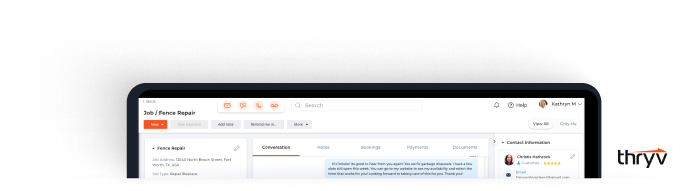
Build Stronger Relationships With Your Customers Using Our Mobile CRM Software for Small Businesses
Our robust CRM software helps you build better relationships with your existing customers and nurture new leads. You can also view and manage all your communications and interactions from anywhere, including on your mobile device or desktop computer.
3. CRMs are too expensive for small businesses.
This belief comes from outdated pricing models. In the past, CRM platforms charged high monthly fees and required additional upgrades for email marketing, text reminders, reporting, and integrations. Small businesses had to patch together multiple tools, and the cost added up fast.
Another factor lowering CRM costs today is platform consolidation. Instead of paying for separate tools for email marketing, messaging, scheduling, and invoicing, many modern CRM systems bundle these capabilities into a single platform. When combined with automation that handles reminders, follow-ups, and customer updates automatically, businesses often save both software costs and hours of manual administrative work each week.
The reality:
Today’s options are significantly more affordable. According to industry data, businesses that fully adopt a CRM report a return of more than $8.70 for every $1 spent on their CRM. While results vary by industry and usage, for many small businesses, that kind of return easily outweighs the monthly subscription cost.
Even better: modern CRMs consolidate multiple apps (email tools, texting tools, calendar systems, invoicing platforms, project trackers). When you switch to a unified CRM, you eliminate:
- Multiple subscription fees
- Duplicate data entry
- App-hopping
- Unnecessary complexity
How Thryv busts this myth:
Thryv isn’t just an affordable CRM; it replaces many of the other software tools small businesses pay for with these integrated features:
- Email marketing platform
- Text reminders and confirmations
- Online scheduling system
- Online payments and invoicing
- Estimates
- Document storage
- Review management
When all of these are bundled into an intuitive, small-business-friendly CRM, the value is unmatched. You don’t just save money, you simplify your entire business.
4. A CRM won’t make a difference because my business runs primarily on word-of-mouth.
Word-of-mouth is powerful, but in today’s marketplace, it’s not enough on its own. Referrals still need nurturing, follow-up, and consistent customer experience.
The reality:
Even when customers come through recommendations, they expect quick replies, professionalism, and convenience. A CRM ensures you deliver all three. Plus, referrals become repeat customers when they feel valued beyond the first transaction.
Today’s referrals also expect digital convenience. When someone is referred to your business, they often research online, send a message, or request an appointment immediately. A CRM ensures that referral leads are captured automatically and routed into follow-up workflows so they receive a response quickly. Some platforms even prioritize leads based on engagement signals, helping business owners focus on the customers most likely to convert.
How Thryv busts this myth:
Thryv helps you:
- Capture referral leads quickly
- Tag them so you know who referred whom
- Automate follow-ups
- Request reviews (which encourage more referrals)
- Keep every communication in one place
Word-of-mouth stays strong when your customer experience is consistent, and that’s precisely what a CRM helps you maintain.
5. A CRM will disrupt the way I already work.
Many small business owners worry that adopting a CRM means overhauling their entire workflow with new processes, systems, and a steep learning curve. But the best CRMs aren’t meant to replace what’s working; they’re meant to make those processes easier, faster, and more organized.
Modern CRM tools are increasingly designed to adapt to existing workflows using automation rather than replacing them. For example, when a customer books an appointment, the CRM can automatically:
- create a customer profile
- send confirmation messages
- schedule reminders
- update the customer timeline
- trigger post-service follow-ups
This means many tasks run automatically in the background, allowing business owners to focus on serving customers rather than managing software.
The reality:
Modern CRMs adapt to your current workflow instead of forcing you to change it. You can start with simple tasks like storing contacts, tracking conversations, or sending reminders, and add more tools as you get comfortable. There’s no requirement to “go all in” on day one.
How Thryv busts this myth:
Thryv connects seamlessly with your existing tools: Google Calendar, Outlook, website forms, social media messaging, and email. It sits on top of your current setup, not in place of it. Instead of disrupting your flow, it pulls everything together so nothing gets lost, duplicated, or forgotten.
6. A CRM is just a contact list.
A CRM today is much more than a digital address book. It’s a centralized customer intelligence system that tracks every interaction across email, text, phone calls, forms, payments, and appointments.
Modern CRM timelines can include:
- conversation history across channels
- appointment records and reminders
- estimates, invoices, and payments
- marketing engagement and campaign activity
- automated follow-ups and reminders
- AI-generated summaries of customer interactions
This gives business owners instant context for every customer interaction.
The reality:
A CRM is not about storing names; it’s about managing relationships. It tracks conversations, payments, appointments, job history, documents, messages, and marketing activity in one dynamic timeline. This level of visibility is impossible with a simple contact list.
How Thryv busts this myth:
Thryv automatically builds a complete customer timeline for every contact. Messages, calls, emails, notes, invoices, estimates, payments, forms, and automations all appear in one place. Instead of guessing where a customer stands, you get an instant snapshot of every interaction.
7. My industry doesn’t need a CRM.
Some business owners hear “CRM” and think it’s only for enterprise tech companies. But customer relationships, and the need to manage them, exist in every industry.
The reality:
If your business interacts with customers, books appointments, sends estimates, handles payments, or relies on repeat business, a CRM makes your operations run more smoothly. CRMs are no longer industry-specific; they’re industry-flexible.
Because modern CRM platforms include automation and flexible workflows, they now support a wide range of industries—from home services and healthcare practices to consultants, retail stores, and professional services. Instead of relying on industry-specific tools, many businesses use a CRM as their central operating system for managing customers, projects, communication, and payments.
How Thryv busts this myth:
Thryv includes CRM automation tools and other features built specifically for small businesses:
- Online booking
- Automated reminders
- Estimate → invoice → payment workflows
- Follow-up messages
- Review requests
- Customer notes and job history
- Project tracking
Work Smarter, Not Harder with the Right CRM
Choosing a CRM today isn’t just about storing customer information—it’s about creating a system that actively helps your business grow. Modern CRM platforms combine customer data, automation, communication tools, and AI-powered insights into a single workspace.
For small businesses, that means fewer missed leads, faster responses to customers, and more repeat business without adding more administrative work. When your CRM handles routine tasks in the background, you gain more time to focus on delivering great service and building lasting relationships with your customers.
CRM Cleanup Guide
Get your CRM data in tip-top shape — and keep it that way!
FAQs
Q: What is a small business CRM, and how does it work?
A: A small business CRM (Customer Relationship Management system) is software that helps businesses store customer information, track conversations, manage appointments, automate follow-ups, and organize sales activity in one place. Unlike spreadsheets or contact lists, a CRM updates customer profiles automatically and shows a full history of interactions, so small businesses can respond faster and build stronger relationships.
Q: Is a small business CRM worth it for very small teams?
A: Yes. A small business CRM is especially valuable for small teams because it prevents missed leads, forgotten follow-ups, and disorganized customer data. By automating reminders, messages, and customer tracking, even solo business owners can save hours each week while increasing repeat business and customer satisfaction.
Q: How much does a small business CRM cost?
A: Small business CRM pricing varies, but modern tools are far more affordable than older enterprise systems. Many CRMs offer monthly plans that replace multiple tools like email marketing, scheduling, invoicing, and texting. For most small businesses, the time saved and increase in repeat customers outweigh the monthly cost.
Q: Do I need technical skills to use a small business CRM?
A: No. Today’s small business CRM platforms are designed to be easy to use, with simple dashboards and built-in automation. Most require little to no setup, no coding, and no technical background. Small businesses can start by managing contacts and gradually add features like automated follow-ups and appointment reminders.
Q: How does a small business CRM help increase repeat customers?
A: A small business CRM increases repeat customers by keeping all customer interactions in one timeline and automating follow-ups like reminders, review requests, and check-in messages. When customers receive timely, personalized communication, they’re more likely to return, leave reviews, and refer others.